
Changing moves and using TMs
Most moves cost nothing to change. Only a short list of strong moves needs a TM, and a TM works on any Pokémon you own.
Two ways to change a move
Open Manage Pokémon and choose Change Moves. You will also reach the same screen when you use a TM from your Backpack. Which one you need depends on the move.
- Ordinary moves (605 of them) are changed for free on the Change Moves page.
- TM-tier moves (19) need a TM item.
The Change Moves page
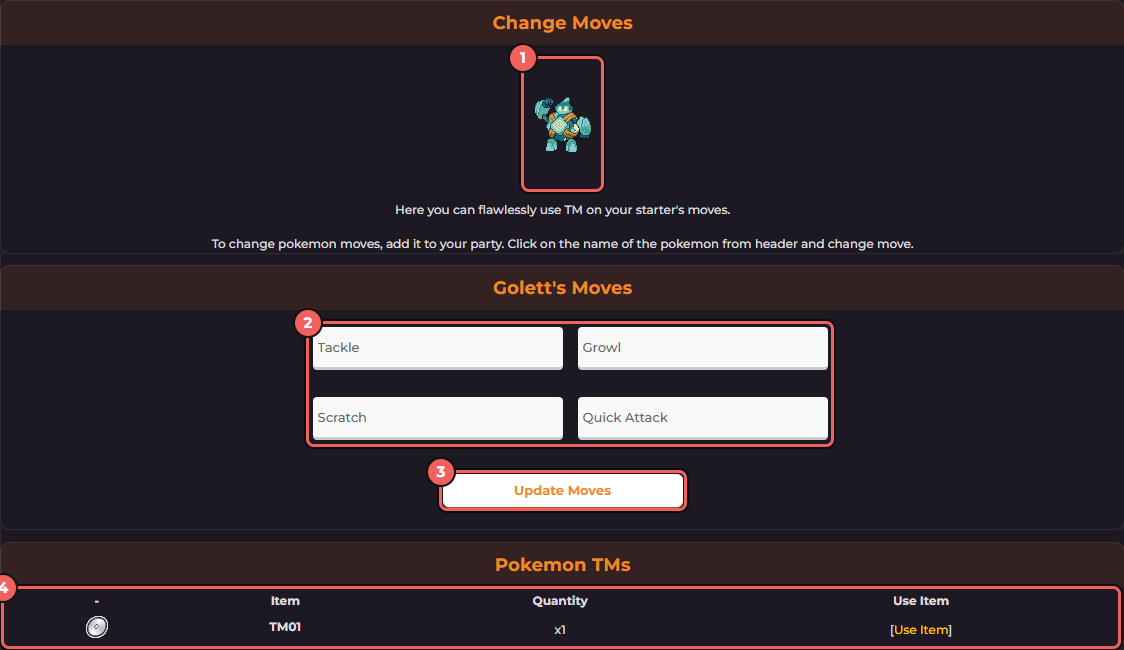
- The Pokémon being edited: always the one in team slot 1.
- One drop-down for each of its four moves.
- Update Moves saves all four.
- Your TMs, with a Use Item link for each one. This list only appears when you own a TM.
This page edits the Pokémon in team slot 1. To change another Pokémon, make it your lead first on the Manage Team page, change its moves, and put your usual lead back.
- Each drop-down lists every ordinary move in the game. A move does not have to be one that Pokémon learns in the main series, and its level does not matter. On a test account, a lead with only Tackle was given Flamethrower, Surf, Ice Beam and Thunderbolt in one go.
- There is no cost, no limit and no waiting time. Change them as often as you like, for example to suit the next Gym.
- Press Update Moves to save. If one of the four is a TM-tier move, the game says "Some of the moves couldn't be updated!" and that move is not changed.
- A loaned Pokémon cannot have its moves changed.
The move pages in this wiki list the Pokémon that learn each move in the main series. Those lists are a good guide to what suits a Pokémon, but they do not limit what you can pick here. Check type, power and accuracy on the moves list.
Moves that need a TM
These moves cannot be picked on the Change Moves page: Dodge, Doom Desire, Draco Meteor, Eruption, Fly, Focus Punch, Frenzy Plant, Hyper Beam, Leaf Storm, Lick, Overheat, Recover, Seismic Toss, Sludge Bomb, Sludge Wave, Swords Dance, Thunder Wave, Toxic, and Twineedle.
The TM items
Only some of the TM-tier moves have a TM item, and each TM is used up when you teach it.
| TM | Move | Where you can buy it |
|---|---|---|
| TM01 | Recover | Not sold in Mart Co. |
| TM06 | Toxic | 49,999 Battle Points in the Battle Points tab of Mart Co. |
| TM15 | Hyper Beam | Not sold in Mart Co. |
| TM73 | Thunder Wave | Not sold in Mart Co. |
| TM75 | Swords Dance | Not sold in Mart Co. |
| TM76 | Dodge | 42,999 Battle Points in the Battle Points tab of Mart Co. |
Some special NPC battles also hand out a TM-tier move straight away when you win. The battle log tells you which of your Pokémon's moves was replaced, and it picks an ordinary move to replace first.
How to use a TM
- Find the TM in the Pokémon TMs list at the bottom of the Change Moves page, or in your Backpack under Use Items. Press Use Item. The TM's description says which move it teaches.
- Pick the Pokémon that should learn it. Any Pokémon you own works, on your team or in your Box, except loaned ones. A search box helps when your Box is large.
- Pick which of its four moves to replace.
- The game confirms with a line like "Golett forgot Growl and learned Recover!" and the TM is used up.
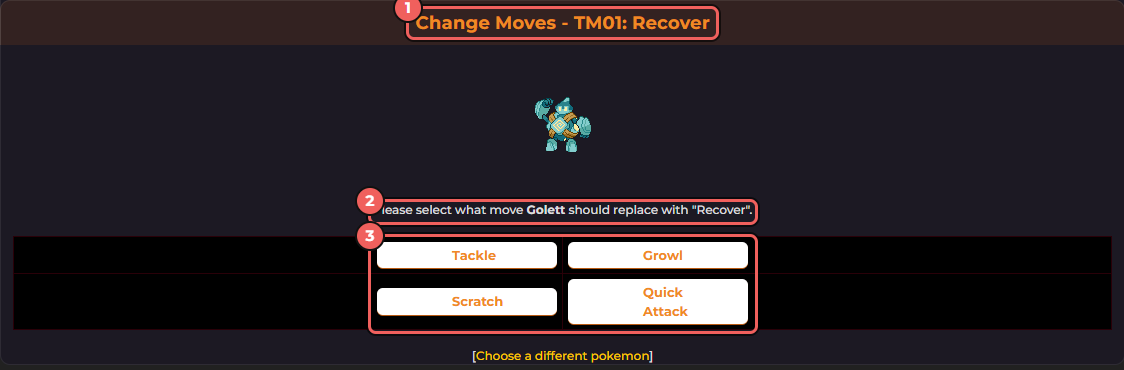
- The TM and the move it teaches.
- The Pokémon that will learn it, and the move it is about to learn.
- Its four current moves. Press the one to forget.
A TM does not care about the species or level, so you can teach a Box Pokémon a TM move without moving it to your team first. If the Pokémon already knows the move, the game says so and the TM is not used.
Common questions
| Question | Answer |
|---|---|
| Can I get a forgotten move back? | Yes. Ordinary moves can be set again on the Change Moves page whenever you like. A TM-tier move needs another TM, so think before you replace one. |
| Does my Pokémon need to be a certain level? | No. Level does not matter for either method. |
| Why did Update Moves say some moves could not be updated? | One of the four picked is a TM-tier move. Teach it with a TM instead. |
Next, read battles and Gyms to pick moves for a Gym, and status conditions for what moves like Toxic and Thunder Wave do.