
Your team and Pokemon Box
Your team is the six Pokémon across the top of the game. Every other Pokémon you own is safe in the Box.
Where to find it
Open any of your Pokémon. The Manage Pokemon tabs are Evolve Pokemon, Equip Starter, Open Box, Change Moves and Nicknames. Choose Open Box. The page has three parts: a short intro, a Search your Pokemon Box panel and a Manage Team panel.
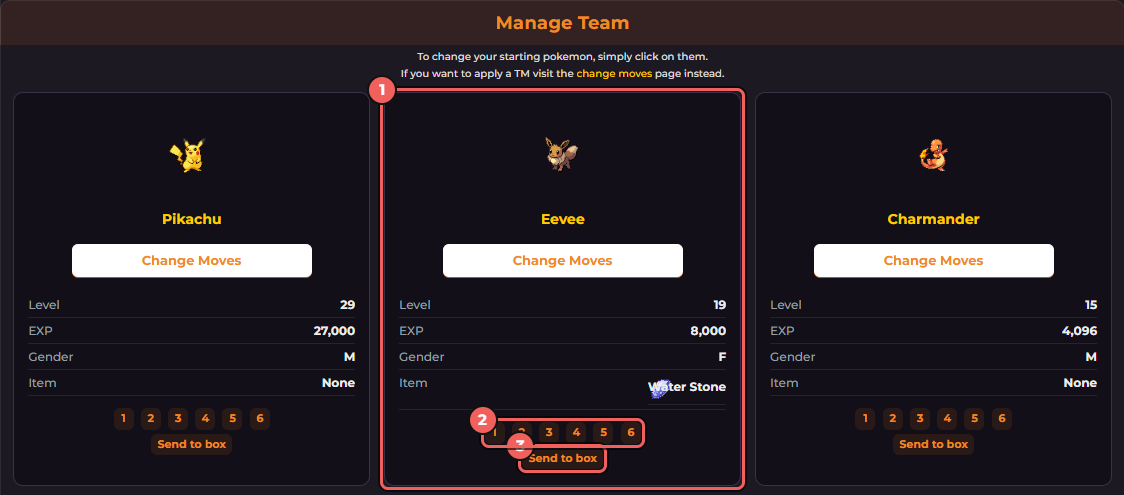
- One card per team slot, with the Pokémon's level, EXP, gender and held item.
- The numbers 1 to 6 move this Pokémon into that slot.
- Send to box takes it off your team.
Move a Pokémon onto your team
- In Search your Pokemon Box, click a letter (or a variant name such as Shiny or Frost) to list the Pokémon in your Box that start with it.
- The list shows each Pokémon's gender, level and held item, plus a Slot column with the links 1 to 6.
- Click the slot number you want. A Pokémon that is already on your team shows the numbers without links.
Fill slots in order. If slot 3 is empty, the game refuses a Pokémon for slot 4 with the message "You can't put a pokemon in that slot if there's no pokemon in the slot before!"
Change the order or remove a Pokémon
- Reorder: on a team card, click the number of the slot you want that Pokémon to go to. Slot 1 is your lead and starts every battle.
- Send to the Box: click Send to box and confirm. You cannot remove your only Pokémon ("You can't remove your only Pokémon from the party!").
- Clear slots 2 to 6: the link at the top of the Box page ("If you want to send slots 2-6 to your box click here") sends five at once.
Ownership and the active team are different things
A Pokémon in the Box is still yours. Only the six on your team fight for you, earn experience and count toward how strong NPC trainers are. Moving one to the Box does not delete, release or trade it.
Before you trade or auction
Pokémon offered in a direct trade or the Auction House must be in the Box, not on your active team. If a Pokémon is missing from the trade list, check that it is not still in one of your six slots. See trading and auctions.