
Moving around the map
Walk with the on-screen arrows, the arrow keys or W, A, S and D. The Location line under the map tells you exactly where you are.
Opening a map
Open Explore and pick a map. Every map has its own wild Pokémon, listed on the places pages. Your catch and discovery chances come from walking, so most of the game happens on this screen.
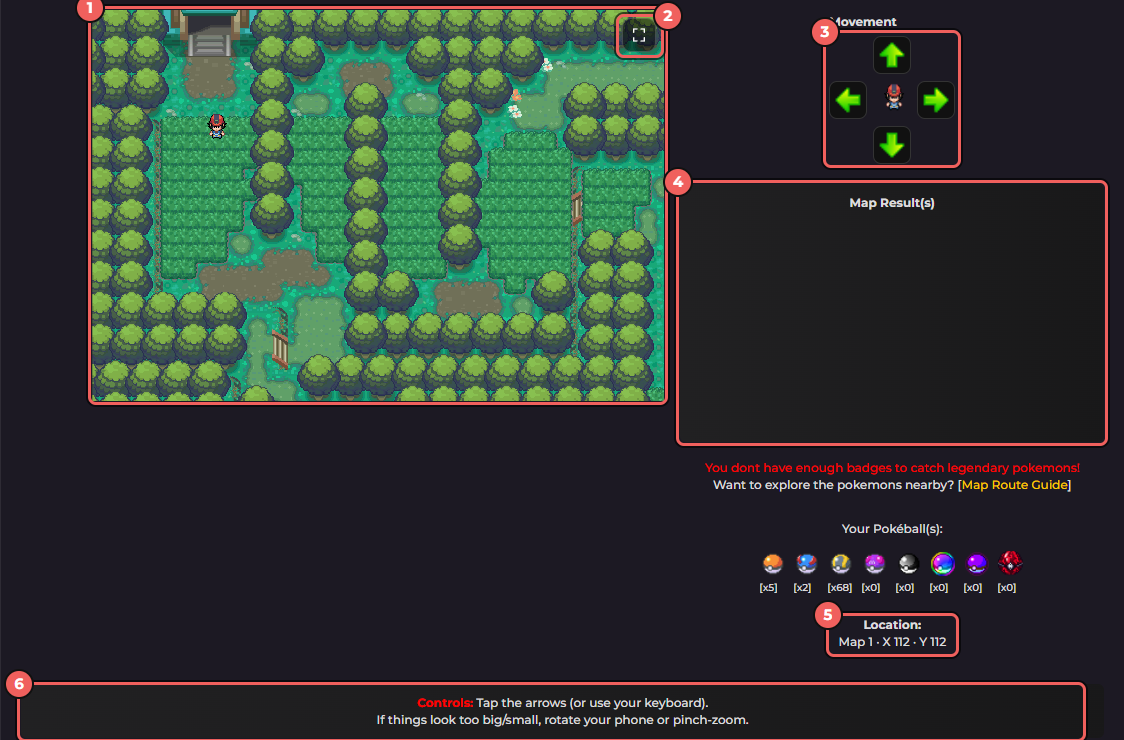
- The map. You are the trainer sprite.
- The full-screen button.
- The Movement arrows.
- Map Result(s): what happened on your last steps, such as a wild Pokémon or an item.
- Location: the map number and your X and Y position.
- The controls tip for phones and keyboards.
Controls
| To do this | Press |
|---|---|
| Walk up | The up arrow button, the up arrow key or W |
| Walk down | The down arrow button, the down arrow key or S |
| Walk left | The left arrow button, the left arrow key or A |
| Walk right | The right arrow button, the right arrow key or D |
| Talk to an NPC | Stand next to them, then press Enter or E (or the Talk button in full-screen mode) |
| Keep an NPC's dialogue going | Enter, Space or E |
The keys do nothing while your cursor is in a text box, so click away from a chat or search box if the keyboard seems dead. On a phone, tap the arrows. If the map looks too big or too small, rotate the phone or pinch to zoom.
Full-screen mode
The button in the top right corner of the map opens a larger map. It has its own arrows, a Talk button that appears when an NPC is next to you, and a chat bar at the bottom. Type a message and press Enter or Say to talk to other trainers without leaving the map.
Reading the Location line
It shows three numbers, like Map 1 · X 112 · Y 112: the map, how far across you are and how far down. If you ask for help in chat or on Discord, give the map and your X and Y and others can find you.
What happens while you walk
- Not every step finds something. The map only makes a discovery check now and then, and most of those turn into a wild Pokémon. The real odds are in finding items on the map.
- When a wild Pokémon turns up, its picture appears on the map and the Map Result panel says Wild name appeared! and asks whether you will catch it, with a button that starts the battle. In full-screen mode the same offer shows as a floating card. See how to catch a Pokémon.
- If an equipped Itemfinder or Dowsing Machine detects something, the game asks Will you pick up this item? and you choose.
- The row of Poke Balls under the map is how many of each ball you are carrying.
- The red line about legendary Pokémon stays until you have all 48 Gym badges. See legendary Pokémon.
- Some tiles are gates that take you to another map.
- Other trainers on the map show as sprites. Click one to open a small menu of things you can do with them.
Talking to NPCs
Walk next to the character you want and press Enter or E. If you are too far away the map says Move next to that character's name first. Keep pressing Enter, Space or E to move through what they say.
Next steps: your first day, battles and Gyms and the Gym leaders.