
Held items and equipping items
Some items do nothing from your Backpack. They have to be equipped to one of four slots on you, the trainer, before they work.
Where to find it
Open Manage Items. It has four tabs: Equip Starter, Use Items, Equip Items and View Chest Pokemons. Choose Equip Items. The page shows what you have equipped now and then a list of equippable items by slot.
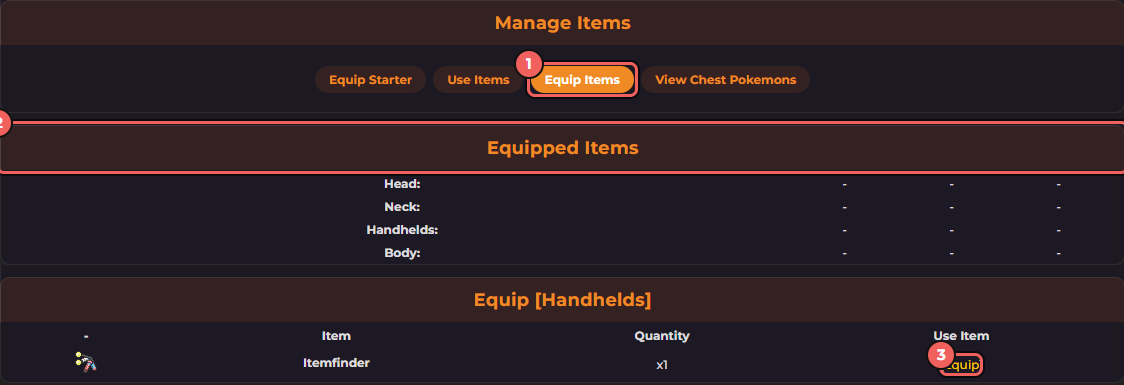
- The Equip Items tab.
- The four slots: Head, Neck, Handhelds and Body.
- Equip: puts that item in the slot.
Equip an item
- Open Manage Items then Equip Items.
- Find the item in the list for its slot. The Itemfinder, for example, is a Handhelds item.
- Click Equip. The game says "You have succesfully equipped your item to your handhelds." and the slot now shows the item.
Swapping and taking off
- Swapping: equipping a new item in a slot that is already full sends the old item back to your Backpack. You do not lose it.
- Taking off: click Unequip next to the item in the Equipped Items table. The game says "You have unequipped your ..." and the item returns to the Backpack.
- If you try to equip something you do not own, the game says "You don't have any of those."
Why bother
The Itemfinder in the Handhelds slot is what lets the map turn up buried items. Without it equipped, you only meet wild Pokémon and Eggs. The odds are on finding items on the map.
This is not the same as a Pokémon's held item
The Head, Neck, Handhelds and Body slots belong to you, the trainer. An item held by a Pokémon, such as a Lucky Egg, is a different thing and is shown on that Pokémon's card. See experience and levels for the Lucky Egg bonus.
Questions or corrections? Discuss it on the forums: Game Guides. More in game mechanics.